



 AlgoStocx Author
 Apr 19, 2025
Follow these simple steps to connect Definedge with AlgoStocx’s Copy Trading Software:
1. First, enable TOTP on the Definedge portal to proceed.
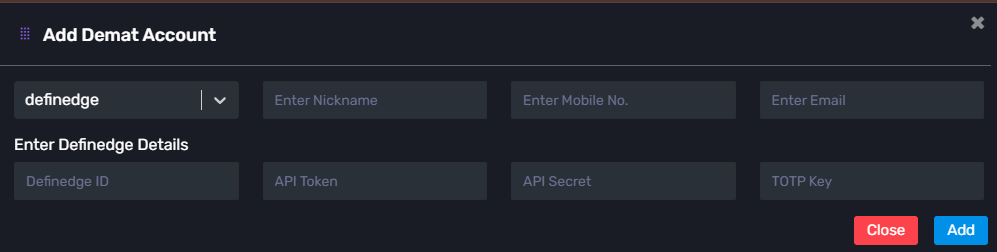
2. Next, add your Definedge account details to the AlgoStocx Copy Trading platform.


Now, visit AlgoStocx’s Copy Trading platform at https://algostocx.com/platform/login. Then, enter your AlgoStocx email ID and password to log in.

Go to the “Demat” tab and click on “Add Demat Account.” Then, choose Definedge as your broker. Fill in the required details: Nickname, Mobile Number, Email, Definedge ID, API Token, API Secret, and the TOTP Key (generated from the Definedge portal). Finally, click on “Add.” A “Broker Connected” pop-up will confirm the successful connection.
By following these steps, you can successfully connect your Definedge account to AlgoStocx’s Copy Trading software and unlock powerful features for a smarter trading experience.

Next Post
Copy Trading With Enrichmoney