



 AlgoStocx User
 Jul 18, 2023
To connect Aliceblue in AlgoStocx’s Copy Trading software, follow these steps:
To begin, open the AliceBlue website using the following link: https://ant.aliceblueonline.com/


For getting an AliceBlue ID:


For getting an “API key”:


Now, go to AlgoStocx’s Copy Trading using the following link: https://algostocx.com/platform/login . Enter your AlgoStocx email ID and password.

To add your AliceBlue Demat account, first go to the “Demat” tab and click on “Add Demat Account.” Next, select AliceBlue as your broker and provide the required details, including your Nickname, Mobile Number, Email, AliceBlue ID, and API Key generated from the AliceBlue portal. After filling in the information, click on “Add.” You will then see a “Broker Connected” pop-up confirming the successful connection.
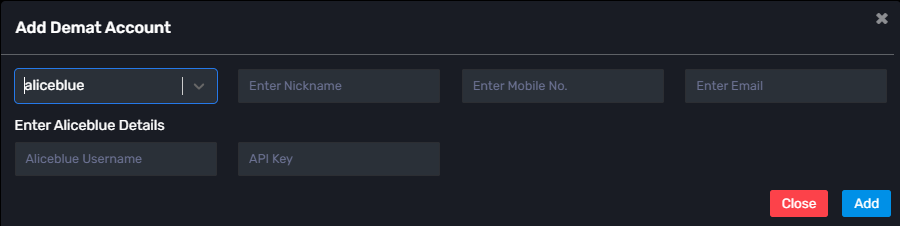
By following these steps, you will successfully connect your Aliceblue account to AlgoStocx’s Copy Trading software and gain access to its features for enhanced trading experiences.

Next Post
Copy Trading with ProfitMart(ProfitMax)